
1D & 2D Barcode Scanners
BangiPOS supports standard USB HID 1D laser and 2D CMOS barcode scanners without proprietary drivers. Choose hands-free omnidirectional desktop scanners for high-volume supermarkets and pharmacies, or wired/wireless handheld 2D imagers for cosmetics bottles, bulky cartons, and shelf stocktakes.
Tested with BangiPOS Windows Desktop · Software priced separately ($20/mo or $1,200)
Available verified 1d & 2d barcode scanners
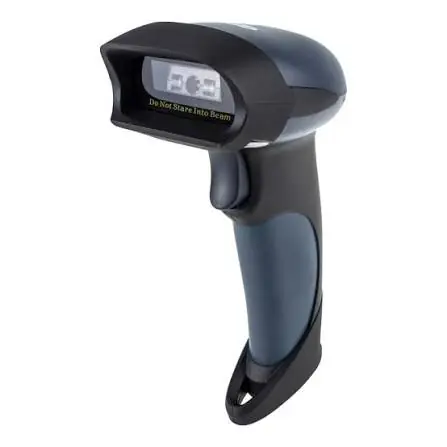
Handheld 1D/2D Barcode & QR Scanner
300 scans/sec, reads phone screens, damaged barcodes, 1.8m drop resistance.
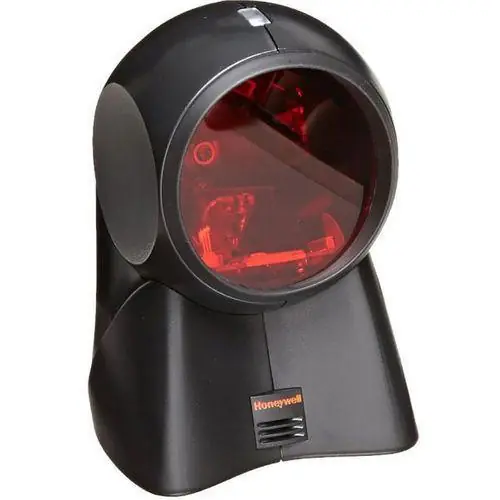
Desktop Mounted Omnidirectional 2D Scanner
360° Omnidirectional Area Imager, Automatic Infrared Motion Trigger, Hands-Free.
Commercial buying specifications
| Specification | Recommended Standard | Why It Matters at Counter |
|---|---|---|
| Optical Type | 2D CMOS Area Imager | Reads 1D EAN/UPC barcodes plus QR codes and damaged/scratched plastic labels. |
| Interface | USB HID Keyboard Emulation (Plug & Play) | Works instantaneously across Windows counters. |
| Form Factor | Omnidirectional Desktop or Pistol-Grip | Mounted scanners speed supermarket lines; handheld triggers help reach heavy cartons. |
| Wireless Option | 2.4GHz USB Dongle (with cradle) | Useful for hardware stores or large wholesale bays. |
Setup checklist & costly mistakes to avoid
Counter Checklist
- Program suffix carriage return (`Enter` key) so BangiPOS adds the item to the cart in one scan.
- Keep one backup scanner at multi-counter stores to eliminate queue delays.
- Verify tiny retail or pharmacy vial barcode readability when using miniature sticky price labels.
Buyer Mistakes to Avoid
- —Do not buy cheap 1D-only red laser wands if you plan to scan QR codes or smartphone digital screens.
- —Avoid pairing flaky PC Bluetooth stacks when a dedicated USB 2.4GHz dongle works more reliably.
Frequently asked questions
Direct operational answers verified against current BangiPOS capabilities.
Can BangiPOS generate barcodes for items that lack manufacturer barcodes?+
Yes. In-house packed items, custom kits, and unlabelled accessories can be assigned internal SKUs/barcodes and printed using compatible label printers.
Do USB scanners require extra drivers on Windows?+
Almost all standard USB HID scanners work plug-and-play immediately when connected to Windows 10 or 11.
Written by Bangi Integrated Technologies Editorial Team · Reviewed by BangiPOS Systems Engineering Desk · Updated November 2026.
Need help pairing 1d & 2d barcode scanners with your counter?
Call or message our Kampala engineering team on WhatsApp with your shop dimensions and computer specs.