
POS Data Export
Your store records belong to your business. BangiPOS provides structured local data export tools so authorised managers and owners can output clean CSV sales summaries, product catalogues, stocktake valuations, and shift totals directly for external accountants, tax preparation, or spreadsheet analysis without vendor lock-in.
Status: Confirmed in current release · Available on $1,200 Lifetime & $20/mo Plans
In-application interface preview
Uncropped desktop screen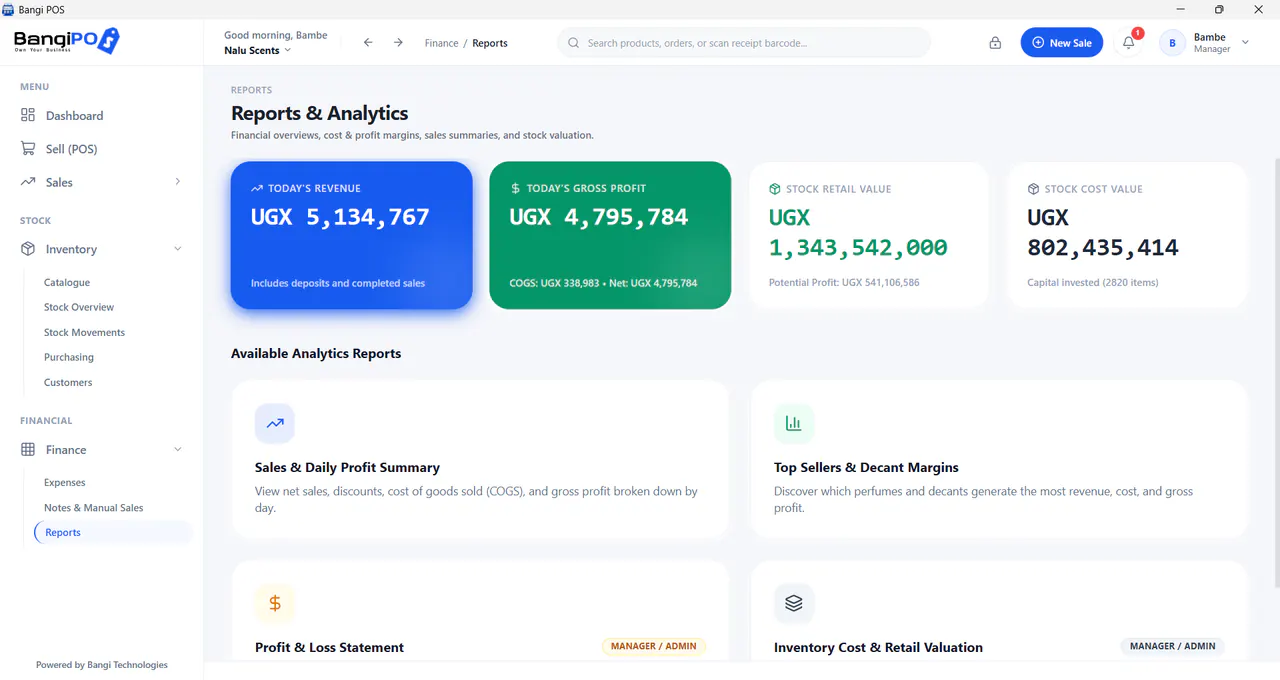
How POS Data Export works day to day
- 01
Authenticate as Owner/Manager
Ensure only authorised leadership accesses full financial/catalogue exports.
- 02
Select Report or Catalogue Scope
Pick sales range, stocktake sheet, or product list to export.
- 03
Generate Clean CSV File
Save portable spreadsheet files directly onto store folders or external drives.
- 04
Hand Off to Accountant
Import cleanly into Excel, LibreOffice, or external bookkeeping software.
Capabilities & transparent limits
Included in Current Release
- Clean portable CSV file exports for sales and stock valuations
- Offline export capability with zero per-export API fees
- Role-locked controls blocking frontline staff from copying trade client lists
Operational Boundaries & Deployment Scope
- —Produces universal portable CSV spreadsheets ready for Excel, LibreOffice, QuickBooks, and Xero import without vendor API lock-in
POS Data Export questions
Direct operational answers verified against current BangiPOS capabilities.
If we cancel the $20/month plan later, do we lose access to our spreadsheets?+
No—export your CSV product sheets and financial summaries beforehand so your records stay completely portable.
Can regular cashiers export all store profits and supplier costs onto a flash drive?+
No—exports and cost reports remain restricted to authorised Owner/Manager credentials.
Which format do exported files use?+
Standard UTF-8 CSV tables compatible with Excel and Google Sheets.
How does export complement backup?+
CSV exports help accountants read spreadsheets cleanly, while encrypted SQLCipher backups restore the full live BangiPOS database.
Written by Bangi Integrated Technologies Editorial Team · Reviewed by BangiPOS Systems Engineering Desk · Updated November 2026.
Ready to evaluate BangiPOS on your store catalogue?
Schedule a live walkthrough, compare the $1,200 lifetime licence against the $20/month plan, or confirm hardware compatibility.