
Inventory Stock Adjustments
Stock adjustments in BangiPOS allow supervisors to align software counts with physical shelves after stocktakes, broken packs, expired cosmetics, or damaged units. Every adjustment requires authorised role access and captures adjustment quantities and reason context for audit clarity.
Status: Confirmed in current release · Available on $1,200 Lifetime & $20/mo Plans
In-application interface preview
Uncropped desktop screen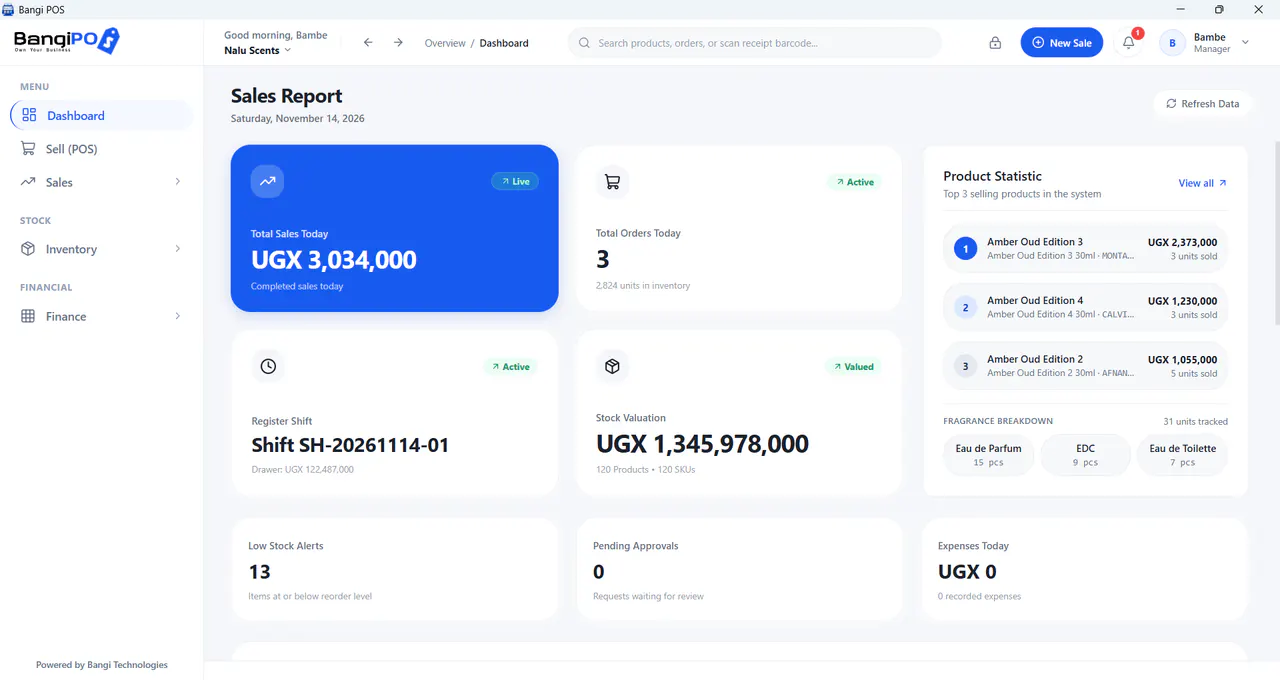
How Inventory Stock Adjustments works day to day
- 01
Perform Physical Shelf Count
Audit actual units or open boxes physically in stock.
- 02
Compare Against System Count
Identify discrepancies from breakage, theft, testers, or unlogged sales.
- 03
Record Reason & Quantity
Log authorised increase/decrease with clear operational reason text.
- 04
Inspect Monthly Variance Trend
Spot recurring loss categories early before margins bleed.
Capabilities & transparent limits
Included in Current Release
- Authorised Manager/Owner role gating on manual count edits
- Clean accounting of broken items, shop samples, and stocktake reconciliation
- Immediate update of live checkout availability and valuation
Operational Boundaries & Deployment Scope
- —Unexplained frequent stock write-offs indicate process or theft gaps requiring management review
Inventory Stock Adjustments questions
Direct operational answers verified against current BangiPOS capabilities.
Should a broken shelf bottle or item be deleted directly or adjusted with a reason?+
Always log an authorised stock adjustment marked damaged/breakage so accounting retains a transparent trail of inventory loss.
Can regular sales cashiers edit shelf stock counts?+
No—keeping stock adjustment permissions restricted prevents covering missing items silently.
How often should small stores reconcile counts?+
Cycle-count top-selling or high-value SKUs weekly, and run full store stocktakes monthly or quarterly.
Can I view a printable stocktake checklist?+
Yes—check /guides/stocktake-checklist/.
Written by Bangi Integrated Technologies Editorial Team · Reviewed by BangiPOS Systems Engineering Desk · Updated November 2026.
Ready to evaluate BangiPOS on your store catalogue?
Schedule a live walkthrough, compare the $1,200 lifetime licence against the $20/month plan, or confirm hardware compatibility.